




Documentation of the Advanced Ordernumbers Plugin for VirtueMart 2.x and 3.x
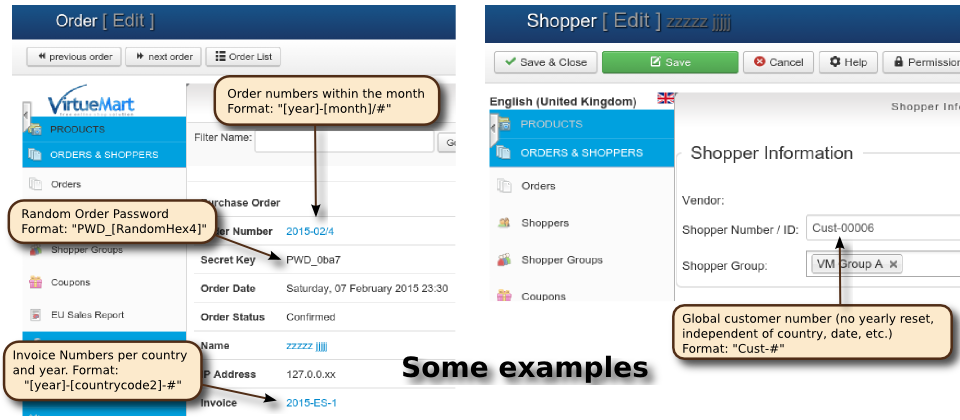
Configuration
After installation in Joomla's extension manager, you need to configure the plugin. It is automatically enabled, but by default, does not change the order and invoice numbers! You have to manually configure the plugin in the Joomla plugin manager (NOT inside VirtueMart!) first:
- Go to the Plugin manager in the Joomla backend ("Extensions" -> "Plug-In Manager")
- Find the plugin named "VM - Custom Order and Invoice Numbers" and click on it. This will bring up the configuration screen for the plugin (in Joomla 2.x the visual layout will look differently, but exactly the same options will be available):
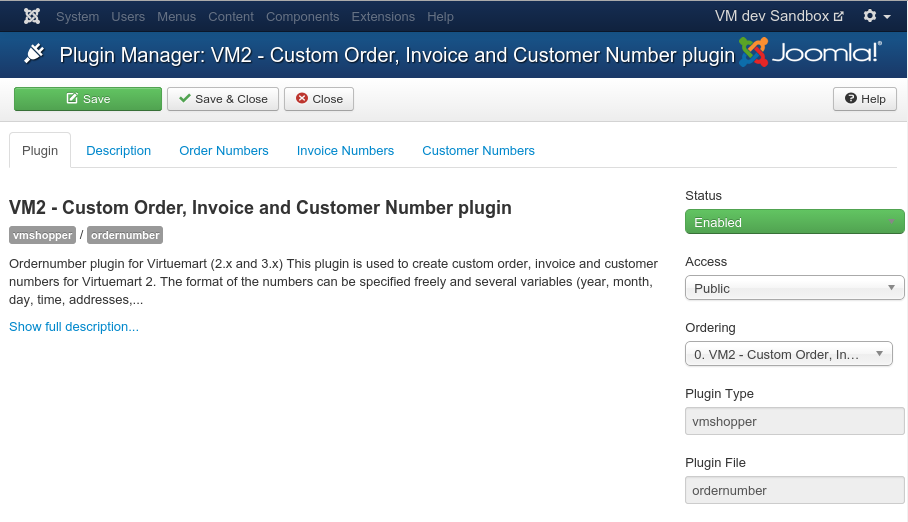
- First change the "Status" to "Enabled" to enable the plugin itself and press the "Save" button on the top.
- Then configure your desired format in the "Order Numbers", "Invoice Numbers" and "Customer Numbers" tabs at the top:
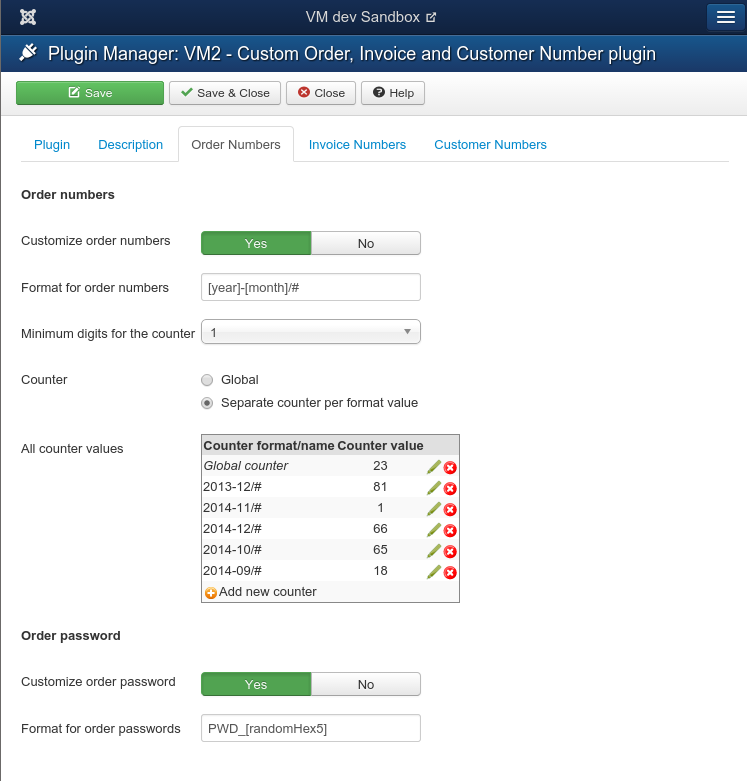
- If you leave one of the "Customize .... number" controls (the first setting in each tab) at its default value of "No", then VirtueMart's default format will be used for that type of number.
- If you enable customizing one of the numbers, you can then change the format in the text box below. The text does not have to follow any particular format, but a # incidates a counter and everything between square backets [...] indicates a variable.
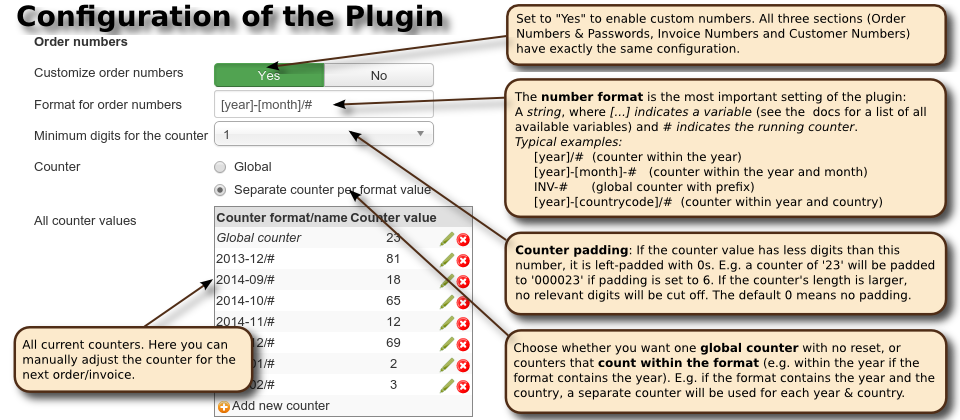
- Formatting the counter itself is done in the number format. To define a counter step or initial value larger than 1, wrap the # for the counter in square brackets and append the step as /step and the inital value as :value, i.e.
[#####:startvalue/step]
Additionally, the padding can then be defined by the number of # given inside the square brackets. For example, a number format"[year]-[####:243/3]"means that the numbers will have the form "2015-0546", where the counter uses 4 digits, is increased by 3 for each order and in 2016 will start at the initial value 243. If either startvalue or step is left out, a value of 1 is used. - The option "Counter" lets you specify whether the counter that will be inserted at the # position in the string should be a global counter or start from 1 for each new value of the remaining format. E.g. If you use a format "[year]-#" and you have the counter set to global, then you will get order numbers 2012-1, 2012-2, ..., 2012-512,2013-513, 2013-514. In particular, the counter will NOT start from 1 if the year changes. If you select "Separate counter per format value", then the counter will start from 1 for a new year: 2012-1, 2012-2, ..., 2012-512,2013-1, 2013-2, ...
- The "All counter values" table lets you manually change a counter value, e.g. if you want your numbers to start from a value different from 1. See below for details.
Frequently Asked Questions (FAQ) ->
How the plugin works
When a new order is submitted, a new invoice is created or a new user is created, this plugin immediately creates the corresponding order/invoice/customer number before VirtueMart uses its default algorithm. VirtueMart then stores this number in the database and does not create its own numbers. This plugin does not override the general order or invoice handling, but only hooks in at that one point where the number is initially created.
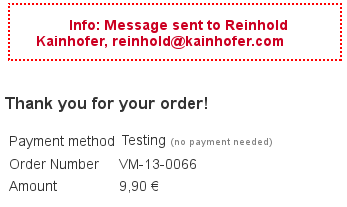
As a consequence, this plugin is not able to change the numbers of existing orders, invoices and customers.
Order/Invoice Number Format Strings
The format strings are simple texts, where the following variables will be replaced. Everything that does not match one of these is taken verbatim into the invoice/order/customer numbers and order password.
| Variable | Ord.Nr. | Pwd. | Inv.Nr. | Cust.Nr. | |
| # | Running counter (either global or per format-value); Not applicable to the order password! | X | - | X | X |
| Date and Time: | |||||
|---|---|---|---|---|---|
| [year], [year2] | Current year (4 or 2 digits) | X | X | X | X |
| [month] | Current month (2 digits); leading zeros if necessary | X | X | X | X |
| [day] | Current day (2 digits); leading zeros if necessary | X | X | X | X |
| [hour], [hour12] | Current hour in 24-hour and 12-hour format; leading zeros if necessary | X | X | X | X |
| [ampm] | Current am-pm (for 12-hour format) in lower-case | X | X | X | X |
| [minute] | Current minute; leading zeros if necessary | X | X | X | X |
| [second] | Current second; leading zeros if necessary | X | X | X | X |
| [decisecond], [centisecond], [millisecond] | Current decisecond (10th of a second), centisecond (100th) and millisecond (1000th) | X | X | X | X |
| Random Numbers and Strings: | |||||
| [randomDigit[n]] | Random sequences of n decimal digits (n=1 if not given). | X | X | X | X |
| [randomHex[n]] | Random sequences of n hexadecimal digits (n=1 if not given). | X | X | X | X |
| [randomLetter[n]] | Random sequences of n (upper- and lowercase) letters (n=1 if not given). | X | X | X | X |
| [randomULetter[n]] | Random sequences of n uppercase letters (n=1 if not given). | X | X | X | X |
| [randomLLetter[n]] | Random sequences of n lowercase letters (n=1 if not given). | X | X | X | X |
| [randomAlphanum[n]] | Random sequences of n general alphanumeric characters (A-Z, a-z, 0-9) (n=1 if not given). | X | X | X | X |
| Billing Address information: | |||||
| Lastname | Last name of the shopper (billing address) | - | - | X | - |
| Firstname, Middlename | First name of the shopper (billing address) | - | - | X | - |
| Company | Company of the shopper (billing address) | - | - | X | - |
| City | City of the shopper (billing address) | - | - | X | - |
| zip, postcode | ZIP of the shopper (billing address) | - | - | X | - |
| country | Full county name (billing address) | - | - | X | - |
| countrycode2 | 2-letter country code (billing address) | - | - | X | - |
| countrycode3 | 3-letter country code (billing address) | - | - | X | - |
| E-Mail address of the customer | - | - | X | - | |
| Order and Invoice details: | |||||
| userName | User name of the customer | X | X | X | - |
| orderNumber | Order number, for which the invoice is created | - | - | X | - |
| orderStatus | Status of the order (abbreviations: S, R, X, C, U, P) | X | X | X | - |
| orderTotal, amount | Total order amount (in the currency of the order). Useful only in custom variable conditions | X | X | X | - |
| orderSubTotal | The order subtotal (before shipment and payment fees) | X | X | X | - |
| orderShipment, orderPayment | The shipment and payment fee of the order | X | X | X | - |
| orderDiscount | The order discount | X | X | X | - |
| Articles | The number of articles in the order (each product counted with its quantity) | X | X | X | - |
| Products | The number of different products in the order (ignoring their quantity) | X | X | X | - |
| List-valued variables, available only in custom variable conditions (see below): | |||||
| skus | List of the SKUs (not product IDs!) of all products in the order | X | X | X | - |
| categories | List of all category IDs (not category names!) of all products in the order | X | X | X | - |
| manufacturers | List of all manufacturer IDs (not manufacturer names!) of all products in the order | X | X | X | - |
| vendors | List of all vendor IDs of all products in the order (only for multi-vendor shops!) | X | X | X | - |
| Internal Variables (use strongly discouraged, except in custom variable conditions): | |||||
| vendorID | (Internal) VirtueMart Vendor ID | X | X | X | X |
| userID | (Internal) VirtueMart User ID | X | X | X | X |
| orderID | (Internal) Order ID, for which the invoice is created | - | - | X | - |
| CountryID | (Internal) Country ID of the shopper's country | - | - | X | - |
| StateID | (Internal) State ID of the shopper's state inside the country | - | - | X | - |
| IPaddress | IP-Address of the shopper's computer | X | X | X | X |
Examples
- For example, a format "[year][month]-#" will create numbers like:
201211-1
201211-2
201211-3
201212-1
201301-1
201301-2
- A format "[year2]-[month]: [randomHex3]-[randomULetter5][randomDigit]-#" will create order/invoice numbers like:
12-11: a3b-ETZKE8-1
12-11: 808-KWCHZ1-2
12-11: 3cfb-JKIKR0-3
12-11: 328-QXPZJ7-4
- If you want the invoice numbers to match the order numbers, you can use a format "[orderNumber]" (notice the lack of the running counter!). However, this might not fulfil the legal requirement of successive invoice numbers, as some orders might be cancelled (but still counted) before an invoice is issued!
- For the order passwords, it is STRONGLY suggested to only use random fields and no fixed parts due to security concerns!
- The default order number of VirtueMart 2 more or less corresponds to a format "[randomHex4]0#", the default order password to a format "p_[randomHex5]" and the default invoice format to a format "[year2][month][day][randomHex4]0#".
- For customer numbers (which are by default not displayed in VirtueMart's invoices) we strongly recommend to use a GLOBAL counter and no date-specific part in the customer number, as this will give a hint of the customer's first order date, which might be even regarded as sensitive information! Also, the customer number format cannot contain any order-specific placeholders for obvious reasons (the customer needs to register BEFORE any order can be created).
Format-specific counters
As a general rule of thumb, whenever any of the variables included in the format changes, the counter will be reset to 1.
For example, with a format "[year]-[month]-[day]/#", the counter will be reset each day. With a format "[year][month][day][hour][minute]-#", the counter will be reset each minute. So by default it is NOT possible to have e.g. a format "[year][month][day]/#" and have the counter reset only yearly.
The details
It's actually a bit more complicated: The plugin does not have one counter, that is reset at the beginning of a new year/month.
Rather is has multiple concurrent counters. When generating the order number, the plugin will first replace all [...] parts with the variable values. Then the resulting string is used as the name for the counter. The counter is looked up in the database (if not found, a value of 0 is used) and then incremented, stored back to the database and inserted for the # in the format.
This approach is best understood at an example:
Number format [year][month][day]-#:
FIRST ORDER on Aug 18, 2014:
- The plugin will insert all variables except for the counter.
Result today: "20140818-#" - Then it checks in the database if a counter with this name already exists.
This is not the case, so it uses a counter of 1:
Result today: "20140818-1" - The counter value 1 for "20140818-#" is stored in the database.
NEXT ORDER on Aug 18, 2014:
- First, the plugin will insert all variables except for the counter.
Result today: "20140818-#" (same as above) - Now this counter already exists and has a value of 1 in the database. The plugin uses this and increases it to 2. Then it inserts this into the order number:
Result today: "20140818-2" - The counter value 2 for "20140818-#" is stored in the database.
FIRST ORDER on Aug 19, 2014:
- The plugin will insert all variables except for the counter.
Result tomorrow: "20140819-#" (different than above!) - Then it checks in the database if a counter with this name already exists.
This is not the case, so it uses a counter of 1:
Result today: "20140819-1" - The counter value 1 for "20140819-#" is stored in the database.
As you can see, with a format-specific counter, whenever any of the variables in the format changes, a new counter is created and it starts from 1.
If you want one global counter that does not reset, simply select "Global counter" in the plugin configuration.
So, in effect it appears as if the counter is reset daily, while in fact a new counter is used for each day. This approach has the advantage that you can have e.g. different counters for orders to different countries. If you use the format "[year]-[countrycode2]-#", each country will have its own counter and you have order numbers like "2014-AT-1", "2014-DE-1", "2014-AT-2", "2014-AT-3", "2014-CH-1", "2014-DE-2", etc. (Notice that the orders for AT have one counter, while the DE have another independent countet).
This approach is very generic (and very simple, yet really powerful), but unfortunately it also means that having a format of "[year][month]#" where the counter is reset only each year is NOT possible by default, since the format value will change each month and the format value will be used as the counter name...
Advanced Topic: Separate counter format
To solve the problem described in the previous paragraph, version 1.12 of the plugin adds the possibility to use custom counter names that are different from the actual number format. These counter formats are appended to the number format after a |. Notice that this is needed only in exceptional cases and certainly not intended for a normal installation. If you think that you really need this feature in your shop, it is probably best to ask in the support forum, because this feature has a lot of potential to cause havoc.
A typical example is a number format like "[year][month]/#" where the shop owner wants the counter to be running inside the year. By default, a new counter will be used each month (since the month variable changes each month...). Starting with plugin version 1.12, the shop owner can now use a number format "[year][month]/#", but let the plugin use a counter name of "[year]/#", which will cause the counter to be reset only at the beginning of each year. The proper format string in this case is:
[year][month]/#|[year]/#
This gives the shop owner even more flexibility, but is quite hard to understand with all consequences. In particular, a wrong counter format can cause orders with duplicate numbers, in which case VirtueMart will append the current timestamp to the number (leading to ugly numbers like "201410/1_2014-10-16T15:10:12". To prevent this, the counter format should ONLY use variables that are also in the number format string. Everything else will lead to duplicate numbers.
Changing counter values (or "How can I start the counter from 1234?")
For each counter, its current value is stored in the database and read from there when the plugin creates a new number. Directly after installation, each counter will start from 1 (its current value is 0). If your shop has been running for a while, you might want it to start from some other value.
The easiest way to achieve this is to set up the plugin, make one test order so that the plugin creates the counter, and then adjust its name in the plugin configuration in the Joomla Backend: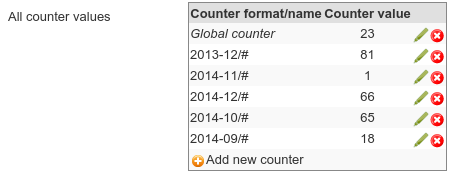
To modify a counter, simply click on the pencil icon on the right and enter the desired new value (remember the value stored on the server is the value of the previous order). The change is immediately sent to the server, i.e. you do not have to press "Save" in the plugin config page.
If you are using a global counter, modify the "Global counter" row, otherwise find the corresponding counter and modify that.
If you don't want to create a test order and the counter you want to modify does not exist yet, you can manually create a counter with the + icon in the last row of the table. Your browser will ask you for the counter name and then send the request to your server to create a counter with that name and initial value 0. To create the global counter, simply leave the field completely empty.
Please read the section on format-specific counters to determine the correct counter name for your format. In particular, the counter name will be the format string where all variables like [year] etc. have been replaced with their corresponding value at the time an order is made. Only the counter (the #) is left unchanged.
Custom Variable definitions
In addition to the pre-defined variables, it is possible to define custom variables for use in the number formats in the "Custom Variables" tab of the plugin configuration:
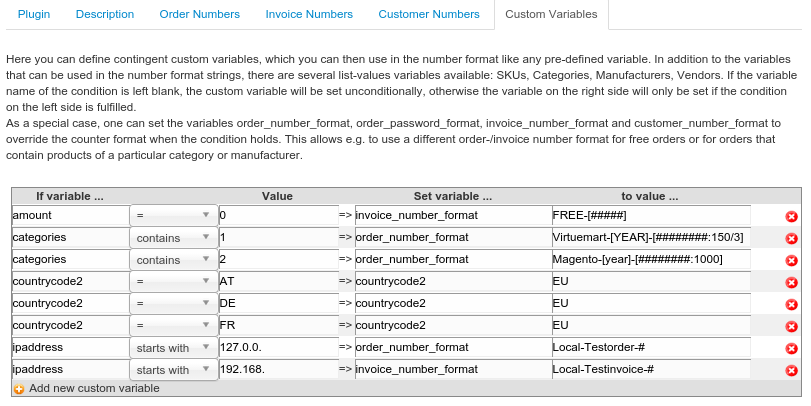
- Each row in the table defines one custom variable definition.
- The first three fields define a condition on an existing variable (list-valued variables like categories and skus are available and need to use the "contains" operator). If the condition is fulfilled, then the variable in the next field is assigned the value in the last input field.
- Multiple rows can assign a value to the same variable. The last assigned value will be used, so the order of the custom variable definitions is relevant.
- If the condition on the left uses no variable name, the assignment is done unconditionally. This can be used to define a default value to a variable which is later overwritten by more specific conditions.
- Pre-defined variables CAN be overwritten (like the countrycode2 in the above example for several EU member states)
- As special cases, one can assign a value to the variables
order_number_format,order_password_format,invoice_number_formatandcustomer_number_formatto change the corresponding number format only for special conditions. In the above example, free orders use an invoice format "Free-[#####]" (first table row), which overrides the configuration of the invoice number format only for those specific orders.
Similarly, all orders containing a product from category 1 will use an ordernumber format "Virtuemart-[year]-[########:150/3]" and orders containing a product from category 2 will use "Magento-[year]-########:1000]". This feature can also be used to exclude test orders (from a particular IP address or network) from the default order/invoice numbering, like the last two rows in the example above show. - The rows of the table can be manually sorted by a simple drag-n-drop on the "=>" or the space before the delete icon on the right.
Automatic Updates
Starting with version 5.99, this plugin uses the Joomla 3.x updater to install new versions. For this to work, you need to enter your updater credentials (order number and password of the purchase at open-tools.net) in the plugin configuration page:
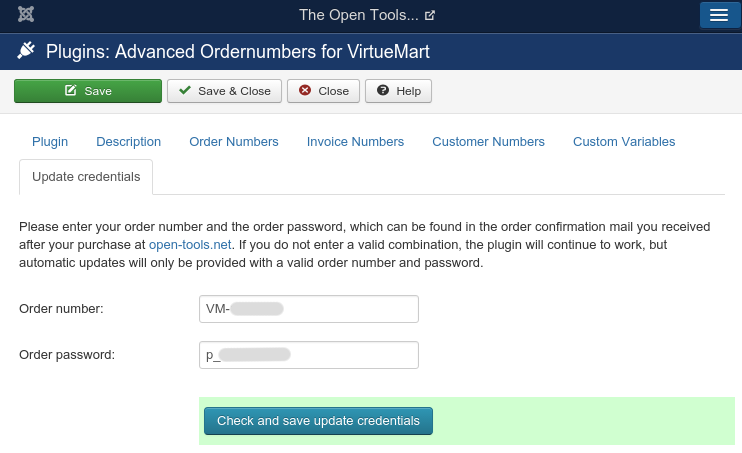
The updater will then access the download at open-tools.net with these credentials, which unlock download access. If you enter invalid credentials, then the plugin will work just fine, only updates are not available:
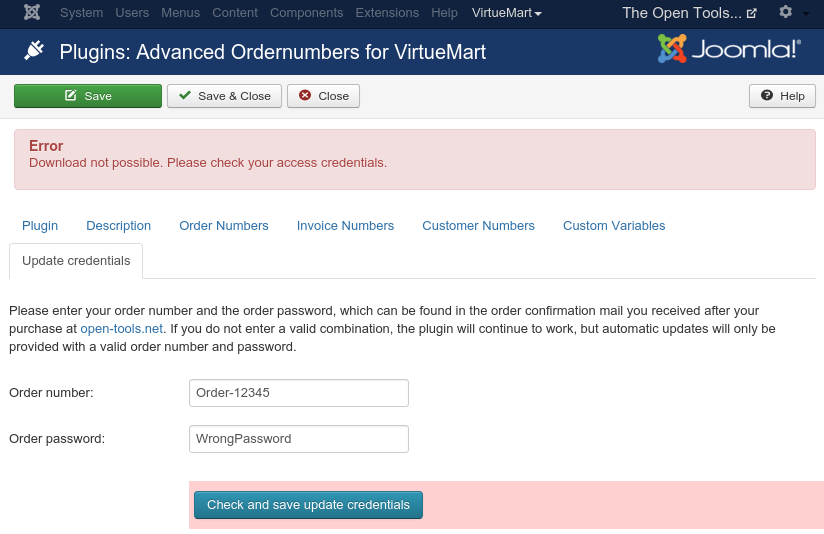
Please note that the automatic update feature for paid plugins (that need some kind of password to unlock the download) is NOT available in Joomla 2.5!
FAQ
License
This plugin is licenced unter the GNU GPLv3. However, you have to pay for the download (all updates are free to our customers). After that, you have all the right and duties that the GPL gives you.
Version History
2017-12-16: Version 4.0.6 (Fix typo in name variable)
2017-09-21: Version 4.0.5 (Fix username variable, add groups and isguest variables)
2017-04-08: Version 4.0.4 (Add DB table check in update script to prevent some installation errors)
2016-05-06: Version 4.0.3 (Fix broken date variables)
2016-05-03: Version 4.0.2 (Bug fix for old php version 5.3)
2016-04-28: Version 4.0.1 (Add onVmOrdernumberPostprocessNumber trigger to allow other plugins to post-process the generated number)
2016-04-10: Version 4.0 (Automatic updates through the Joomla updater; code factorization into a library)
2015-12-12: Version 3.6 (Fix manual invoice creation for old orders)
2015-12-03: Version 3.5 (Fix automatic invoice creation)
2015-11-16: Version 3.4 (Fix JS call; Fix SQL update script erasing counters)
2015-11-15: Version 3.3 (Workaround for changed VM invoice creation)
2015-06-12: Version 3.2 (Fix counter editing)
2015-05-15: Version 3.1 (Fix bug with global counter)
2015-04-24: Version 3.0 (Added custom variable definitions; some more variables; counter properties directly in the number formats)
2015-03-08: Version 2.2 (Fix jQuery on VM3 / Joomla 2.5)
2015-02-08: Version 2.1 (Add hooks to allow other plugins to extend the ordernumber plugin)
2014-12-02: Version 2.0 (Counter values can be changed in the plugin configuration)
2014-10-05: Version 1.13 (Fixed a small packaging glitch, no changed functionality)
2014-10-04: Version 1.12 (Add possibility to give custom counter names; VERY ADVANCED feature, Not meant for an average installation)
2014-10-01: Version 1.11 (Fix issue with invoice numbers in certain configurations)
2014-09-06: Version 1.10 (Fix some minor issues with Joomla 3.0)
2014-08-16: Version 1.9 (update for Joomla 3.x and VirtueMart 3.x compatibility; drop Joomla 1.5 support)
2013-02-26: Version 1.8 (add backward support for the outdated Joomla 1.5)
2013-01-22: Version 1.7 (implement country variables)
2013-01-11: Version 1.6a (fix some update problems from 1.5 to 1.6)
2013-01-09: Version 1.6 (customer numbers can also be customized)
2012-11-16: Version 1.5 (implement padding the counter with zeros)
2012-11-23: Version 1.4 (fix random elements in the formats)
2012-11-17: Version 1.3 (fix python 5.2 for real; fix German translation)
2012-11-15: Version 1.2 (fix for phython 5.2; only create invoice number when neccessary)
2012-11-14: Version 1.1 (implement variables derived from user data)
2012-11-12: Version 1.0 (initial release for Joomla 2.5)